

Online Alarm vs Phone Alarm: What Is the Difference?
Both do the same basic job - make a sound at a time you picked. But an alarm running in a browser tab and an alarm built into your phone's operating system are doing that job in genuinely different ways, and which one makes sense depends a lot on what you're actually using it for.
Here's the honest comparison, including where each one has real advantages and where it doesn't.
Quick Answer: Online Alarm or Phone Alarm?
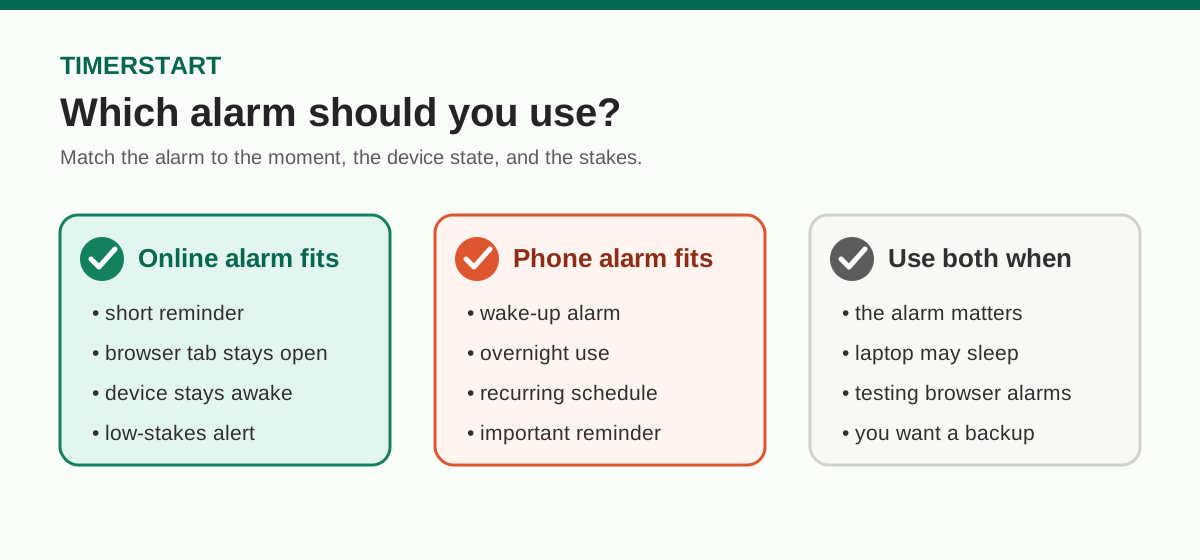
Use an online alarm when you're already sitting at a computer, need a short reminder, don't want to install anything, and the tab and device are going to stay active anyway. Missing it wouldn't be a big deal.
Use a phone alarm when you need to actually wake up, the alarm runs overnight, it needs to repeat daily, your laptop might close or sleep before then, or the thing you're being reminded about really matters.
Short version: a browser-based alarm is convenient for an active session at your computer. A phone alarm is generally the safer bet for wake-ups and anything important.
Need a quick reminder while your browser is open? Set a short alarm with TimerStart's Online Alarm Clock.
Use a Browser Alarm for Active Sessions
Use TimerStart's Online Alarm Clock when you need a quick browser-based reminder while your tab and device stay active.
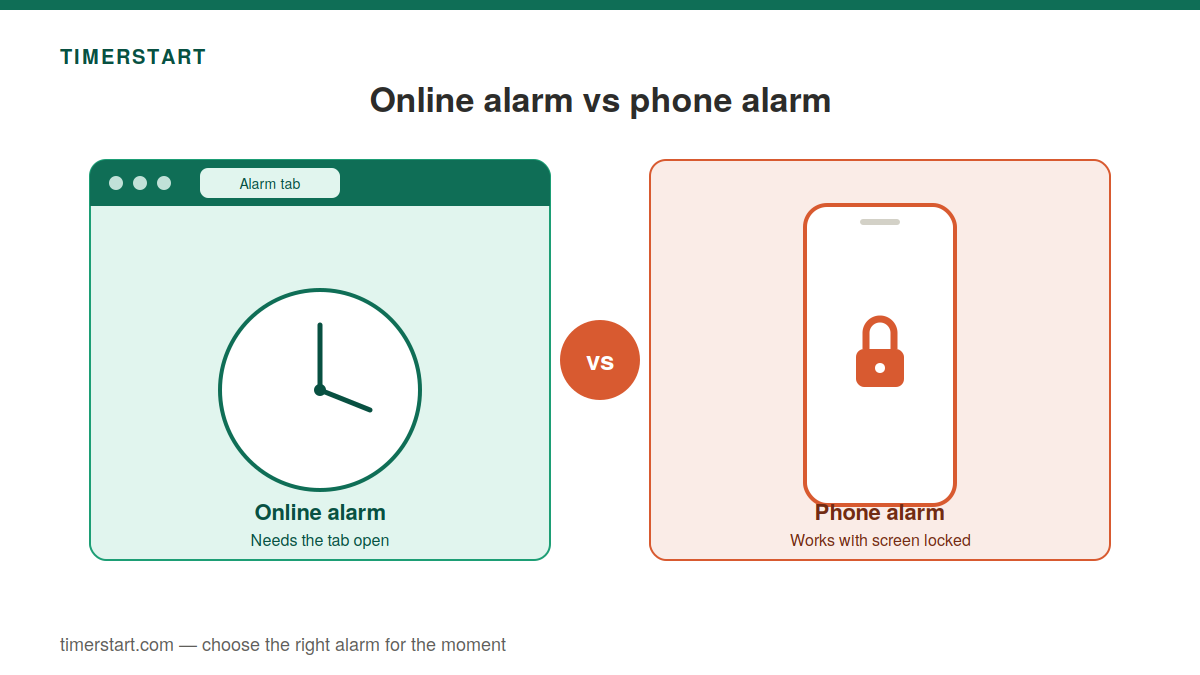
How an Online Browser Alarm Works
An online alarm like TimerStart runs entirely inside a webpage. You set a time, the page tracks it, and when that time arrives, it plays a sound through your browser - no installation, nothing running outside the browser.
That also means it inherits the same requirements as any open webpage: the tab has to stay open, the device has to stay awake, and sound comes out through whatever audio output is currently active. Change any of those, and the alarm's behaviour changes with it.
TimerStart specifically needs no installation, runs client-side, lets you set an alarm, use quick alarm options, snooze, stop, control sound, and view a live countdown - all of which still depends on the page staying open.
How a Phone Alarm Works
A phone alarm runs through an installed Clock or alarm app built into the phone's operating system. It doesn't need a browser tab - it's part of the device itself, which is why the screen can typically be locked while the alarm still knows when to go off.
Most native alarm apps support repeating schedules, with sound and vibration configurable through the app. How Do Not Disturb interacts with an alarm depends on the specific phone, app, and settings - not identical everywhere.
Worth naming directly, since it's often assumed universal: Apple states that alarms in the iPhone Clock app sound even when Silent mode or Do Not Disturb is on. That's a documented iPhone behaviour, not automatically true for every Android phone or third-party alarm app - worth checking your own device rather than assuming.
Online Alarm vs Phone Alarm at a Glance
| Feature | Online browser alarm | Phone alarm |
|---|---|---|
| Installation | None required | Usually preinstalled or added as an app |
| Where it runs | A browser webpage | The device's operating system |
| Needs a browser tab open | Yes | No |
| Works after the browser closes | No | Not dependent on the browser |
| Laptop sleep | Page may stop running | Doesn't apply to a phone alarm |
| Locked phone screen | Not relevant on desktop; varies on mobile browsers | Commonly continues to work |
| Recurring alarms | May be limited | Commonly supported |
| Do Not Disturb | Browser sound behaviour can vary | Varies by platform and settings |
| Sound output | Follows the device's current audio path | Phone's alarm sound settings |
| Best suited for | Short reminders during an active session | Wake-ups and important recurring alarms |
Worth noting: this table describes general patterns, not fixed rules - actual behaviour varies by browser, device, and settings on both sides.
What Happens If the Browser or Tab Is Closed?
Briefly, since this is covered in more depth elsewhere: TimerStart's page needs to stay open to keep working. Close the tab, and the alarm stops with it. Close the whole browser, and the same thing happens, since the page is gone either way. Minimising the window is different - that's fine, the page is still open. A phone alarm doesn't have this dependency at all, since it isn't tied to a browser tab in the first place.
For the fuller picture on closed tabs and Do Not Disturb specifically, see the existing closed browser and Do Not Disturb guide.
What Happens When a Laptop Enters Sleep Mode?
This is worth being direct about: a browser alarm shouldn't be expected to wake up a laptop that's gone to sleep. Sleep mode pauses most of what a browser page is doing, and closing a laptop lid is a common way that gets triggered without anyone really deciding it should happen. Minimising a window doesn't cause this - sleep is a different, deeper state.
A phone alarm doesn't have this problem, simply because it's running on the phone rather than the sleeping laptop. If there's any real chance your laptop might sleep before the alarm time, the phone alarm should be the one you actually rely on.
Screen Lock, Silent Mode, and Do Not Disturb
Browser alarms and native phone alarms don't get treated the same way by their respective systems.
A browser alarm depends on ordinary browser and device sound rules - a muted tab or blocked site sound affects it the same way it would affect any other webpage audio. Do Not Disturb behaviour on mobile browsers can vary quite a bit.
A phone alarm is commonly given special treatment by the operating system specifically because it's an alarm - which is part of why it can keep working with the screen locked, and why, on some platforms like iPhone specifically, it can sound through Do Not Disturb. That's a platform-specific behaviour, though, not a universal rule for every phone and every app.
Sound, Volume, and Audio Output
An alarm can trigger exactly on time and still go unheard, because the sound path is a separate thing from the timing.
For an online alarm, sound goes through browser audio, which can be affected by a muted tab, blocked site sound, or a browser's autoplay restrictions - modern browsers can restrict automatic sound, particularly if the page hasn't had the interaction it expects. It also plays through whatever output device is currently active, which might be headphones rather than speakers.
A phone alarm uses the phone's own alarm or notification sound system, which often has a separate volume control from regular media volume, and commonly supports both sound and vibration together. Exact behaviour still depends on the specific device and its settings.
When an Online Alarm Is the Better Choice
There are real, practical situations where a browser alarm is genuinely the more convenient option.
Good fits
- work-break reminders
- study-session alerts
- short meeting alerts
- classroom or presentation timing
- quick reminders during active browser use
Why it helps
- nothing to install
- fast to set up
- large visible clock
- live countdown
- right there in the browser
The advantages are real. It's just not the right tool for every situation - that part matters too.
When a Phone Alarm Is the Better Choice
A phone alarm makes more sense anywhere operating-system integration actually matters.
Better fits
- morning wake-ups
- overnight alarms
- daily recurring schedules
- important appointments
- travel alarms
- anything critical
Why it helps
- screen-lock operation
- recurring schedules
- vibration support
- no browser-tab dependency
- safer for must-not-miss reminders
That said, a phone alarm still isn't foolproof - it needs battery, the alarm has to actually be enabled, the volume needs to be set right, and the app itself needs to be working correctly.
Why a Browser Alarm May Not Ring
Briefly, since this deserves its own dedicated treatment rather than a rushed summary here: a browser alarm can fail to ring because the tab or browser got closed, the laptop went to sleep, the tab or device was muted, sound went to a different output than expected, the alarm was set incorrectly, or the device's clock or time zone was off.
For a full troubleshooting walkthrough, see the existing online alarm reliability guide, which goes into each of these in more depth than makes sense here.
Should You Use Both as a Backup?
Sometimes, yes - and it's a genuinely sensible approach rather than overkill. It makes sense when you're using an online alarm for something you're actively working on, but you also have something that can't be missed, when you're not sure the laptop will stay awake, when you're testing a browser alarm for the first time, or when the stakes are just high enough to justify the extra step.
A reasonable setup: phone alarm as the primary alarm for anything critical, TimerStart as a secondary one while you're actively working in the browser. No need to stack alarms for something low-stakes, though - that's more caution than the situation calls for.
Backup Rule
For anything important, use the phone alarm as the primary alarm and TimerStart as a convenient browser-based backup while you work.
A Simple Alarm-Choice Checklist
A few questions worth running through before you decide:
Will the browser tab realistically stay open? Will the computer stay awake the whole time? Is this an overnight alarm? Does it need to repeat? Is it for waking up? What actually happens if you miss it? Do you need vibration? Could the sound end up routed to headphones instead of speakers? Have you actually tested it? And is this important enough to want a backup?
If you need a quick browser-based reminder while the page and device stay active, TimerStart fits well. If you need a wake-up, a recurring alarm, an overnight alarm, or anything critical, a phone alarm is the safer choice. If it's somewhere in between, using both isn't unreasonable.
Use TimerStart for Browser-Based Reminders
Open TimerStart's Online Alarm Clock, select the alarm time, double-check AM or PM, choose and test the sound, and confirm the countdown actually appears. Keep the tab open and the device awake, and for anything critical, back it up with something else.
Choose a time, test the sound, and keep the TimerStart tab open while you work.
FAQs About Online and Phone Alarms
These answers cover the common questions people ask when choosing between a browser alarm and a phone alarm.
What is the difference between an online alarm and a phone alarm?
An online alarm runs inside a browser tab and needs the page to stay open. A phone alarm runs through the device's operating system and doesn't depend on a browser at all.
Is an online alarm as reliable as a phone alarm?
Not generally for anything critical. A phone alarm is built into the operating system and typically continues through screen lock; a browser alarm depends on the page, browser, and device all staying active.
Does an online alarm work if the browser is closed?
No. Closing the tab or the browser stops a browser-based alarm.
Does an online alarm work if the tab is in the background?
It can, though background tabs are often subject to browser throttling, which may affect timing. It isn't guaranteed to behave identically to a foreground tab.
Will a browser alarm work during laptop sleep mode?
Not reliably - sleep mode pauses most active browser-page activity.
Will a phone alarm work when the screen is locked?
Commonly, yes, since native alarms are usually designed to keep working through a locked screen - though this still depends on the phone and its settings.
Will a phone alarm ring during Do Not Disturb?
It depends on the platform. Apple states that iPhone Clock alarms sound during Silent mode and Do Not Disturb; this isn't guaranteed for every Android device or third-party app.
Why is my online alarm not ringing?
Usually the tab or browser closed, the device slept, the sound was muted, or the alarm wasn't set correctly. For a full walkthrough, see the alarm-reliability article linked above.
Why did the alarm trigger without sound?
That's typically a separate sound-path issue - tab mute, blocked site audio, or the wrong output device - rather than a timing problem.
Does an online alarm need internet?
Generally you need to load the page once; ongoing behaviour depends on how the specific tool is built.
Can I minimise the TimerStart window?
Yes - minimising is different from closing, and the page keeps running while minimised.
Should I use an online alarm for waking up?
It's not the safer option for that. A phone alarm is generally better suited to wake-ups, since it doesn't depend on a browser tab or an awake laptop.
Which alarm is better for work reminders?
An online alarm is often perfectly convenient here, provided you're staying at the computer anyway.
Which alarm is better for overnight use?
A phone alarm, generally, since it isn't affected by the laptop going to sleep or the browser closing.
Should I set a backup alarm?
For anything important, yes - pairing a browser alarm with a phone alarm is a sensible approach when the stakes are high enough.
Can I use an online and phone alarm together?
Yes, and it's a reasonable strategy: phone alarm as the primary for anything critical, browser alarm as a convenient secondary while you're actively working.
Related reading
For more detail about browser tabs, sound settings, and Do Not Disturb, read the online alarm reliability guide. For work-session timing ideas, see 30 minute timer for study, work, and breaks.